Introduction
Every business that buys, stores, or sells physical products needs a reliable way to know what it has, where it is, and where it's going next. That's the job of the Inventory module in Odoo 19 — it gives a business a single, real-time picture of its stock, instead of relying on spreadsheets, memory, or physical recounts to answer a simple question: "do we have this in stock?"
As a business grows, this real-time visibility becomes less of a convenience and more of a necessity. Multiple warehouses, larger product catalogs, and higher order volumes make manual tracking unreliable very quickly, which is exactly where Odoo 19 Inventory's core concepts — warehouses, locations, operation types, and units of measure — start to matter.
Understanding these concepts first makes everything that follows easier to apply: how a typical stock movement flows from receipt to delivery, the controls that keep those figures accurate, and the reporting that turns that data into real business decisions.
What Is the Inventory Module in Odoo 19?
At its core, Inventory is the app that tracks the physical movement and quantity of every product a company handles — from the moment goods arrive from a supplier, through however many storage locations they pass, to the moment they leave as a delivery to a customer or another warehouse. Everything else in Odoo that touches physical stock — Sales, Purchase, Manufacturing, Point of Sale — ultimately reads from and writes to the same Inventory data, which is what keeps stock figures consistent across the entire system rather than living in separate silos.
This matters more than it might first appear. Businesses that track stock in spreadsheets, or across several disconnected systems, run into the same recurring problems: numbers that are already out of date by the time someone checks them, no easy way to see why a quantity changed, and no shared source of truth between the sales team, the warehouse, and finance. A dedicated inventory system solves this by making every stock movement — a receipt, a sale, a transfer, an adjustment — a recorded transaction that updates the same live figures everyone else is looking at, at the same time.
Core Concepts You Need to Know
A small number of building blocks make up almost everything in Odoo Inventory. Once these are clear, the rest of the module — including more advanced features — becomes far easier to follow.
1) Warehouses and Locations
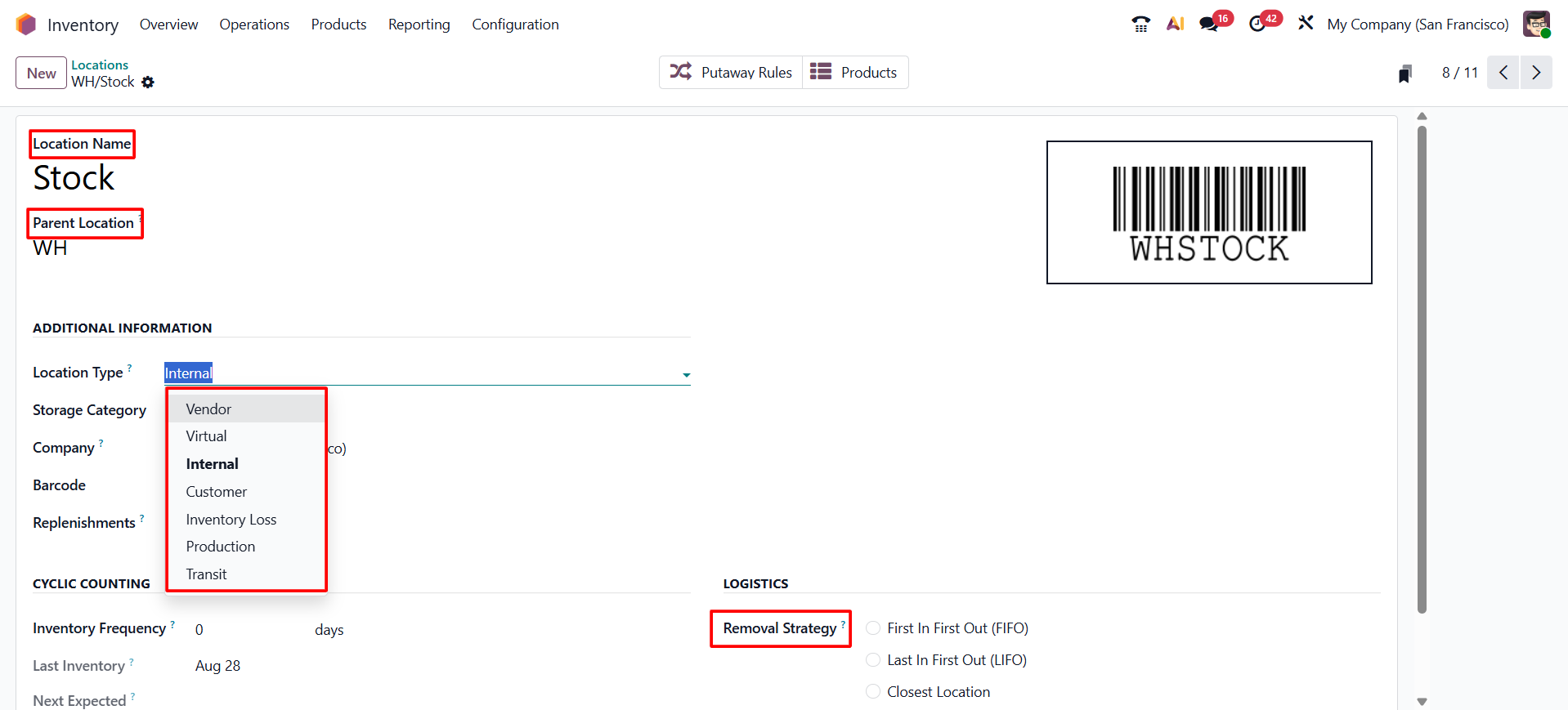
A warehouse represents a physical facility — a factory, a store, a rented storage unit. Inside a warehouse, Odoo lets a business break space down into locations: specific zones such as a receiving dock, a storage rack, a quality-control area, or a packing bench. This hierarchy is what makes it possible to know not just that a product is "in the warehouse," but exactly which shelf, zone, or stage of the process it's currently sitting at.
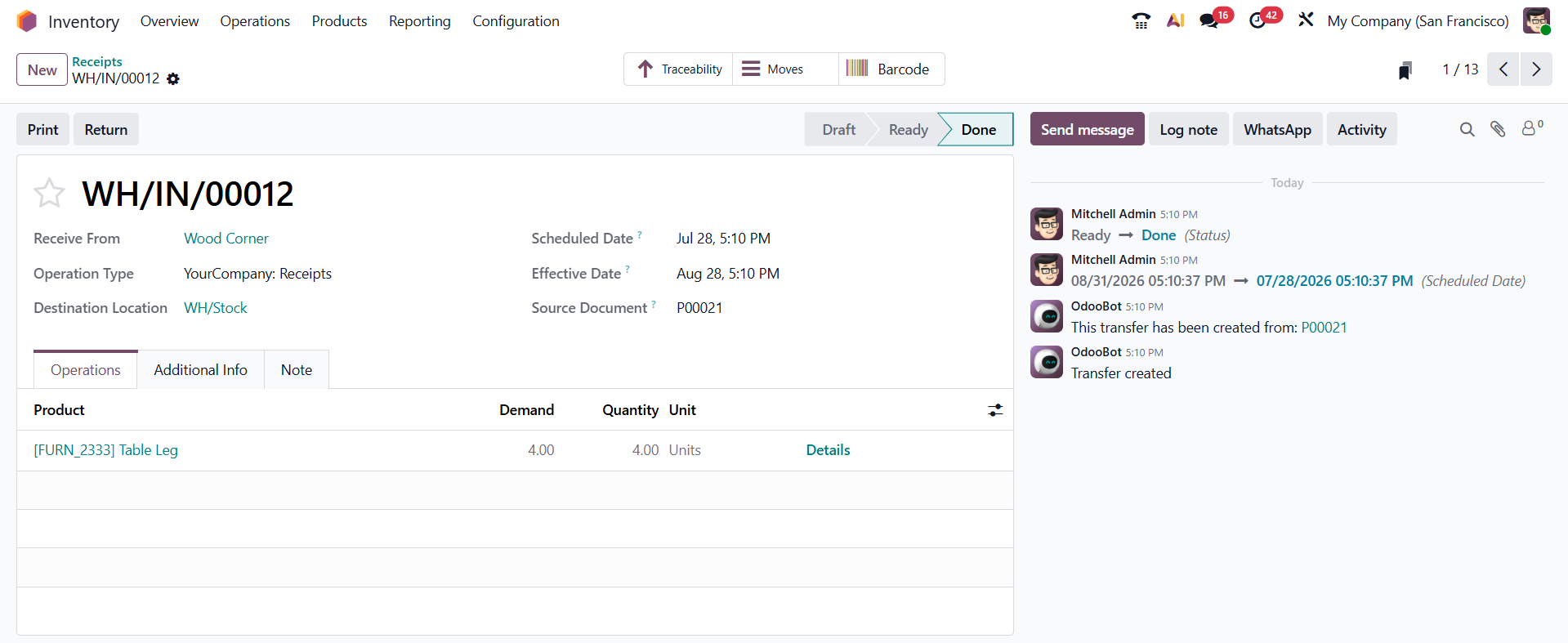
Not every location represents physical shelf space. Odoo also uses virtual locations — such as "Vendors" and "Customers" — to represent stock that has left the tracked system entirely. A Receipt, for instance, is really just a stock move from the Vendors virtual location into a physical location inside the warehouse, and a Delivery is a move from a physical location out to the Customers virtual location. Once this clicks, receipts, deliveries, and transfers stop looking like three unrelated features and start looking like the same underlying idea — a move from one location to another — applied in different directions.
2) Operation Types: Receipts, Deliveries, and Internal Transfers
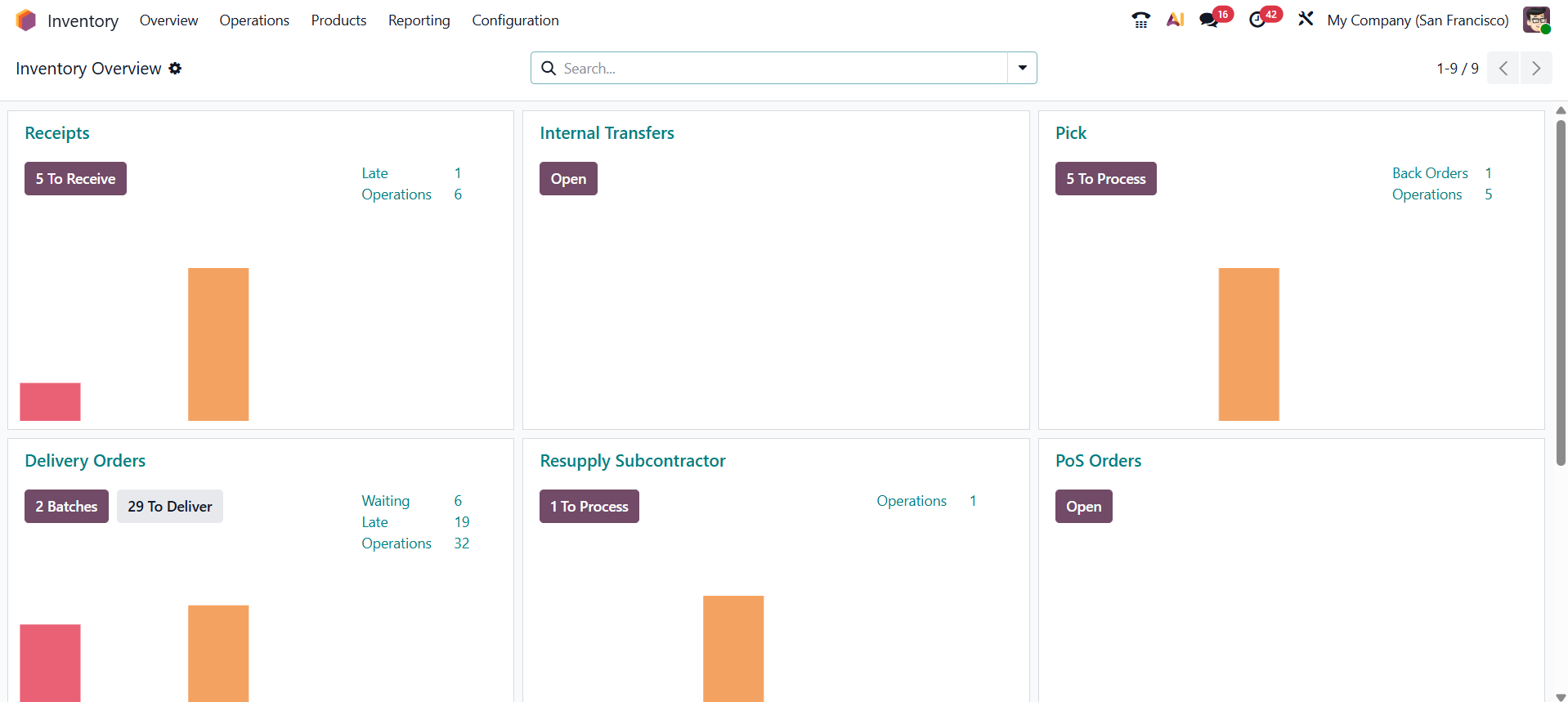
Every stock movement in Odoo happens through an operation type, and almost everything can be traced back to three basic kinds: a Receipt brings goods into the warehouse (typically from a vendor), a Delivery sends goods out (typically to a customer), and an Internal Transfer moves goods between two locations inside the business, such as from a receiving dock to long-term storage, or between two warehouses.
Each of these can also be configured to happen in more than one step. A small business might receive goods directly into stock in a single step, while a larger operation might add a quality-control stage before goods are considered available, or a dedicated packing step before a delivery leaves the building. Odoo supports one-step, two-step, and three-step receipts and deliveries for exactly this reason — the underlying idea stays the same, only the number of checkpoints changes.
3) Products and Units of Measure
Every item tracked in Inventory is a product record, and each product is measured in a specific unit — kilograms, liters, individual units, and so on. Getting this right matters more than it seems: Odoo uses each product's unit of measure to calculate stock levels, costs, and conversions consistently everywhere that product appears, from a purchase order to a bill of materials.
Products also come in different types, and this choice changes how Inventory treats them. A storable product is the most common type for physical goods — its quantity is tracked, reserved, and reported on. A consumable is used up in operations but isn't tracked as an exact on-hand quantity, and a service isn't a physical item at all, so it never touches stock. Setting the right type early on avoids confusing reports later, where a product either shows quantities that don't matter or is missing quantities a business actually needs to see.
4) Lots and Serial Numbers
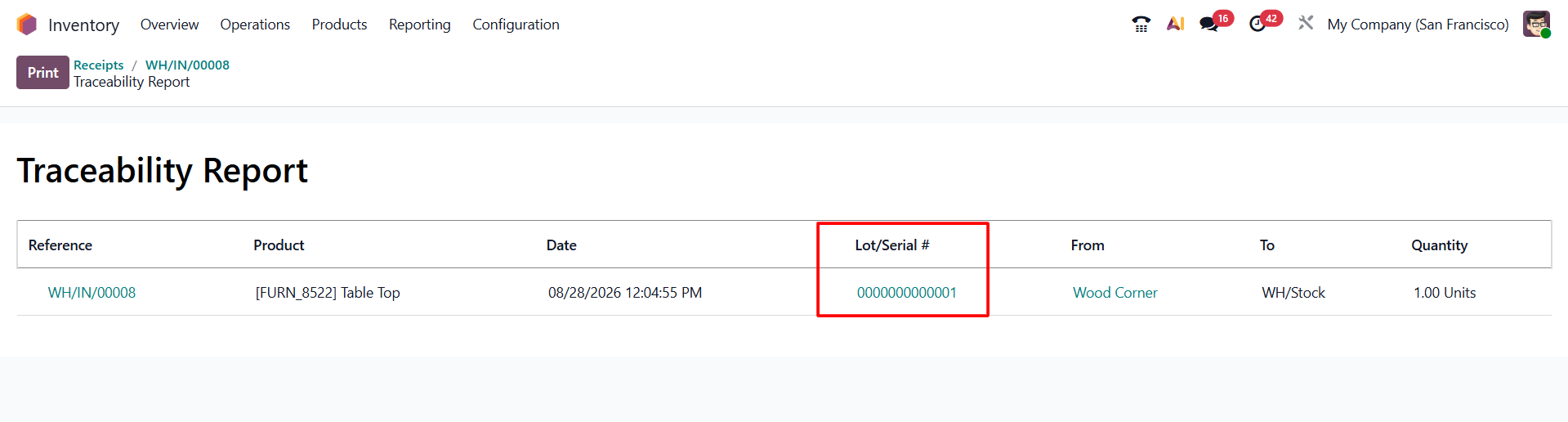
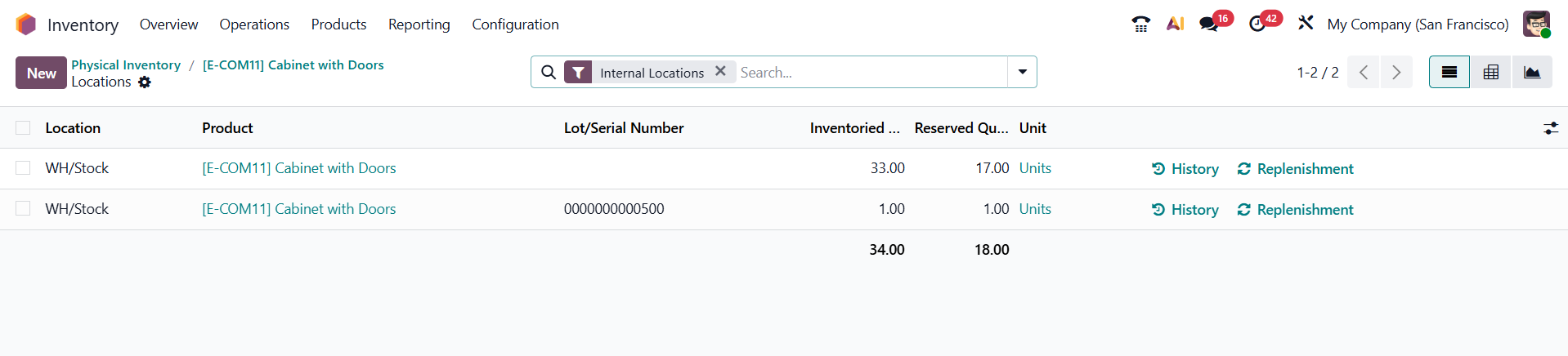
For many products, knowing "how many" isn't enough — a business also needs to know which specific batch or unit it's dealing with. Odoo supports two ways of doing this: a lot number groups a batch of identical items received or produced together (common for food, chemicals, or anything with an expiry date), while a serial number identifies a single, individual unit (common for electronics, equipment, or anything covered by a warranty). Once a product is tracked this way, every receipt, transfer, and delivery records which lot or serial number moved, which is what makes full traceability possible later.
How Inventory Works in Practice
Understanding the concepts above makes the day-to-day flow straightforward. A typical cycle looks like this: a purchase order is confirmed, which automatically creates a Receipt; when the goods physically arrive and that Receipt is validated, stock increases at the receiving location. From there, an Internal Transfer (automatic or manual, depending on configuration) can move that stock into proper storage. When a customer places an order, Sales automatically generates a Delivery; validating it decreases stock and records that the goods have left. At every step, Odoo keeps a full history of the movement, so a business can always trace exactly when and where a given quantity moved.
Behind this simple flow, Odoo is quietly doing more automated work than it first appears. Putaway rules can decide exactly which shelf, rack, or zone a received product should be sent to, based on the product itself or its category, so staff aren't left guessing where something belongs. Removal strategies then decide which specific batch gets picked first when an order needs to go out — First In, First Out (FIFO) picks the oldest stock first, Last In, First Out (LIFO) picks the newest.
None of this happens in isolation, either. Sales orders, Purchase orders, Manufacturing orders, and Point of Sale transactions are all connected to the same Inventory data: confirming a sales order reserves stock and schedules a delivery, confirming a purchase order schedules an incoming receipt, and completing a manufacturing order consumes components and produces finished goods, all updating the same real-time figures. Routes and rules are what let a business chain these connected operations together so replenishment, transfers, and even purchasing happen automatically instead of manually. None of this needs to be configured to get started, but it's worth knowing this depth exists as a business's needs grow.
Keeping Stock Accurate: Physical Counts and Adjustments
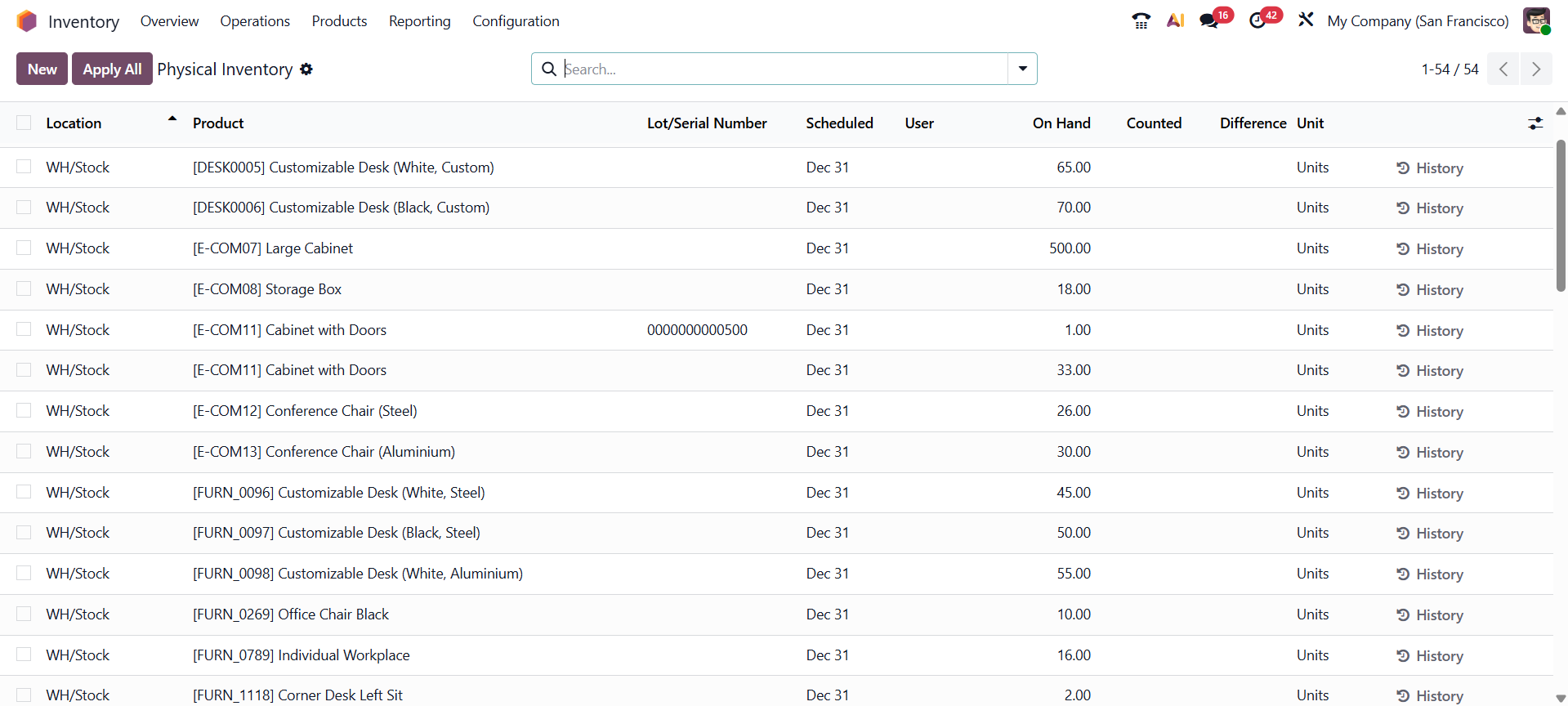
Automation keeps stock figures updated as transactions happen, but it can't catch everything — items get damaged, misplaced, or occasionally miscounted at receiving. Odoo handles this through inventory adjustments, which let staff record a physical count and have the system automatically create the correcting stock move, along with a clear record of what changed and why. For businesses that don't want to count everything at once, scheduled cycle counts can be set up to check specific locations or products on a rolling basis instead, which spreads the effort out and keeps figures accurate without shutting down operations for a full count.
Damaged or lost goods that shouldn't simply be adjusted away are handled through scrap, which removes the quantity from usable stock while still keeping a record of it, rather than making the loss silently disappear from the numbers. Together, these tools are what keep the automated side of Inventory trustworthy over the long run — automation handles the everyday moves, and these controls catch the exceptions.
Common Uses and Benefits
✧ Real-time stock visibility — knowing exactly how much of a product is available, and where, at any moment — across one warehouse or many — without waiting for a manual count. A sales team can promise accurate delivery dates because they're looking at the same live numbers the warehouse is.
✧ Avoiding stockouts and overstock — seeing accurate on-hand and incoming/outgoing quantities makes it possible to reorder at the right time instead of guessing, which keeps cash from being tied up in excess stock while still avoiding missed sales.
✧ Traceability and compliance — lot and serial number tracking makes it possible to trace a specific batch forward to the customers who received it, or backward to the supplier it came from — essential for industries like food, pharmaceuticals, or manufacturing, where a recall or audit needs fast, precise answers.
✧ Faster, more accurate operations — barcode scanning support turns receiving, picking, and shipping into fast, low-error processes on the warehouse floor, cutting down the manual data entry that usually causes count discrepancies in the first place.
✧ Multi-warehouse and multi-company management — a growing business can add new warehouses, storage locations, or even separate legal companies without adopting a different system — the same concepts and screens simply scale up.
✧ Connected operations across the business — because Inventory shares its data with Sales, Purchase, Manufacturing, and Point of Sale, stock figures stay consistent everywhere at once instead of needing to be reconciled between separate tools.
✧ Better decision-making — built-in reporting on stock valuation, movement history, and forecasted needs gives managers the numbers they need without exporting data elsewhere or waiting on a spreadsheet to be updated.
Reporting and Forecasting
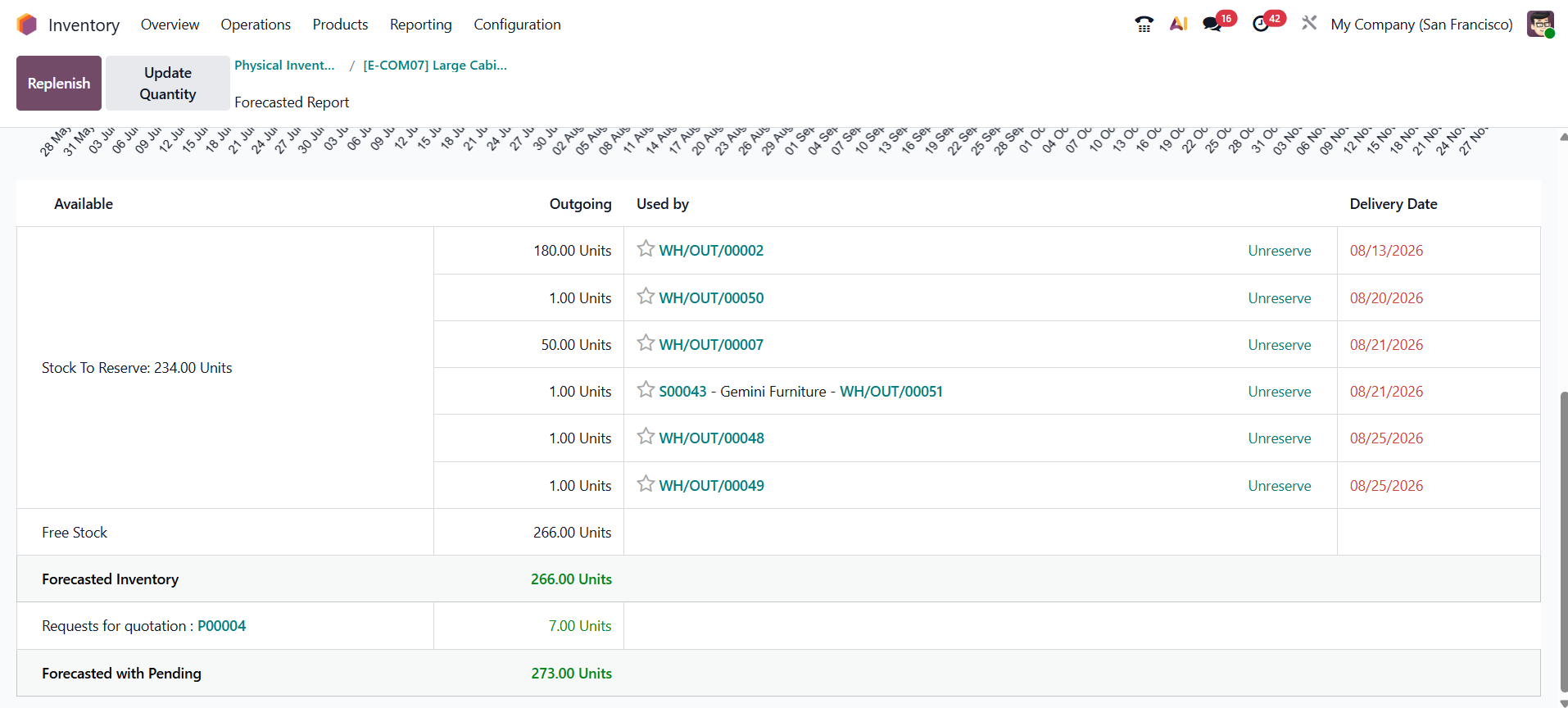
Beyond day-to-day transactions, Inventory includes reporting built specifically to support planning and finance. The Forecasted report looks ahead rather than just at the present, showing what's currently on hand alongside what's already scheduled to arrive (from confirmed purchase or manufacturing orders) and what's already committed to leave (from confirmed sales orders), giving a realistic picture of what will actually be available on a given date rather than just what's sitting on the shelf today.
The Inventory Valuation report, meanwhile, ties stock quantities to their monetary value, which matters for accounting as much as for warehouse management — it's how a business knows not just how many units it has, but how much of its capital is currently sitting on shelves. Together with the movement history kept on every stock move, these reports mean a business never has to choose between operational detail and a high-level view; both are available from the same data.
Conclusion
Odoo 19 Inventory turns stock management from a matter of memory and manual counting into a live, connected system: every receipt, transfer, and delivery is recorded the moment it happens, every product carries the traceability a business actually needs, and every other app that touches physical goods reads from the same accurate numbers. Getting comfortable with these fundamentals — warehouses and locations, operation types, products, and tracking — is really all it takes to start running a business on real-time inventory instead of best guesses.