Introduction
As a warehouse grows, deciding by hand where every product should be stored, how it should be replenished, and how it moves between locations quickly becomes unmanageable. Items with expiry dates need to move on a first-in, first-out basis; fast-moving products need to sit close to the packing area; temperature-sensitive goods need their own storage zone; and every purchase or sales order needs the right stock to appear in the right place at the right time. Doing all of this manually is slow and error-prone.
Odoo 19 Inventory solves this with two connected features: Routes and Rules. Together they automate how products are purchased, manufactured, stored, and transferred, so the system moves stock on its own once the logic is set up correctly. A route defines the path a product follows, and the rules attached to it decide exactly when and how stock actually moves along that path — which is what turns replenishment, storage, and transfers from manual decisions into something Odoo handles on its own.
Understanding Routes
A route is a defined pathway that tells Odoo how a product should travel — whether it is being purchased, manufactured, stored, sold, or transferred between warehouses. Rather than deciding manually every time an order comes in, a route lets a business set the path once, on the product or product category, and let Odoo apply it automatically from then on.
Every route is made up of one or more rules. The route itself doesn't move anything; it simply groups the rules that will act together and decides which products or operations it applies to.
Understanding Rules
If a route is the direction, a rule is the instruction that actually makes something happen along that direction. A rule creates a stock move from one location to another whenever a specific condition is met, such as a sales order being confirmed, a manufacturing order needing components, or stock at a location dropping below what's needed.
In short: routes provide the path a product follows through the warehouse or supply chain, and rules are what generate the real, individual stock movements along that path. A single route commonly chains two or more rules together so that if the first can't fully satisfy a need, the next one automatically takes over.
The Five Rule Actions
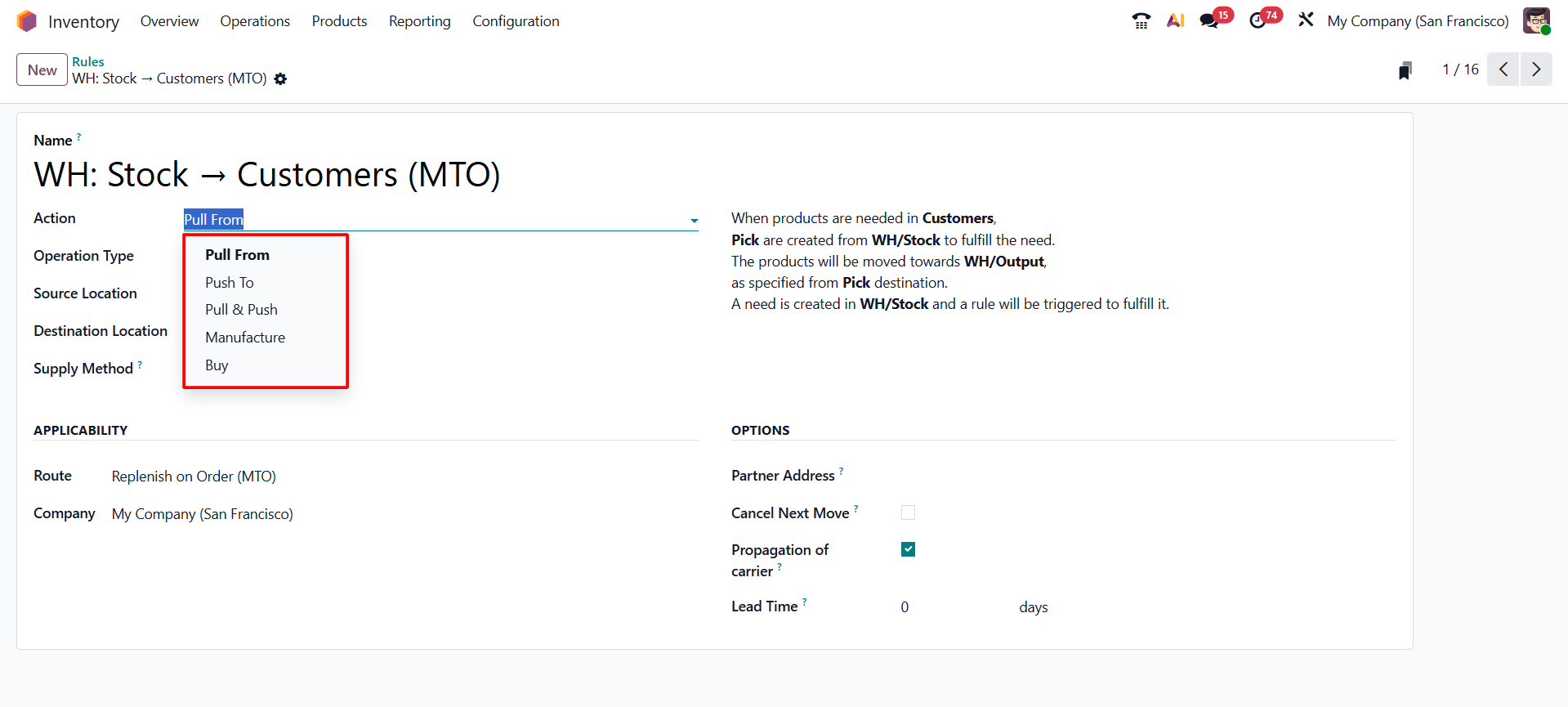
Every rule is built around one of five actions, which decides what kind of movement or document the rule produces:
✧ Pull From — retrieves stock from a source location to a destination location whenever the destination needs it — for example, moving goods from a storage rack to a picking area when an order is ready to be packed.
✧ Push To — automatically forwards a product to another location as soon as it arrives somewhere — for example, moving every vendor delivery straight from the receiving dock into a designated storage zone without anyone initiating it manually.
✧ Pull & Push — combines both behaviors on the same rule, which is useful for more complex multi-warehouse setups where stock needs to be pulled into a location and then automatically pushed onward.
✧ Manufacture — creates a manufacturing order automatically when the product is needed but isn't available in stock, so production is triggered without manual intervention.
✧ Buy — creates a purchase order automatically when the product is needed but isn't available in stock, routing the shortage straight to procurement.
The Three Supply Methods
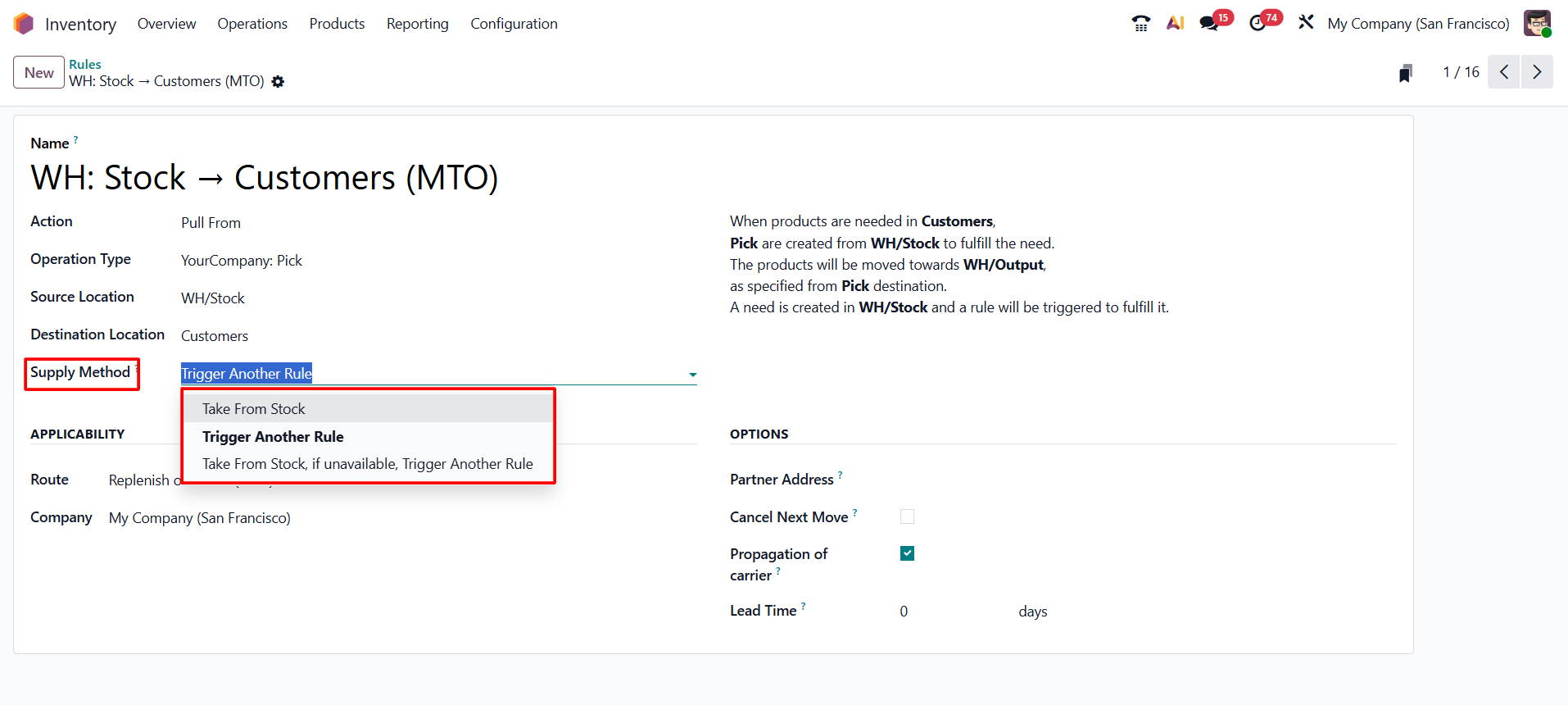
Alongside the action, a rule also defines a supply method, which controls how Odoo checks stock availability before it acts:
• Take From Stock — checks the source location first and only moves what's actually available; if there isn't enough, the rule waits rather than triggering anything further.
• Trigger Another Rule — skips the stock check entirely and immediately hands off to the next rule in the chain — useful when a location is never meant to hold buffer stock.
• Take From Stock, if Unavailable, Trigger Another Rule — tries to fulfill the need from the source location first, and only falls back to the next rule if stock isn't sufficient — the hybrid option used in most real replenishment routes.
Step-by-Step: Setting Up Rules and Routes in Odoo 19
With the concepts in place, the following steps walk through the actual configuration in Odoo 19, in the order a reader would perform them.
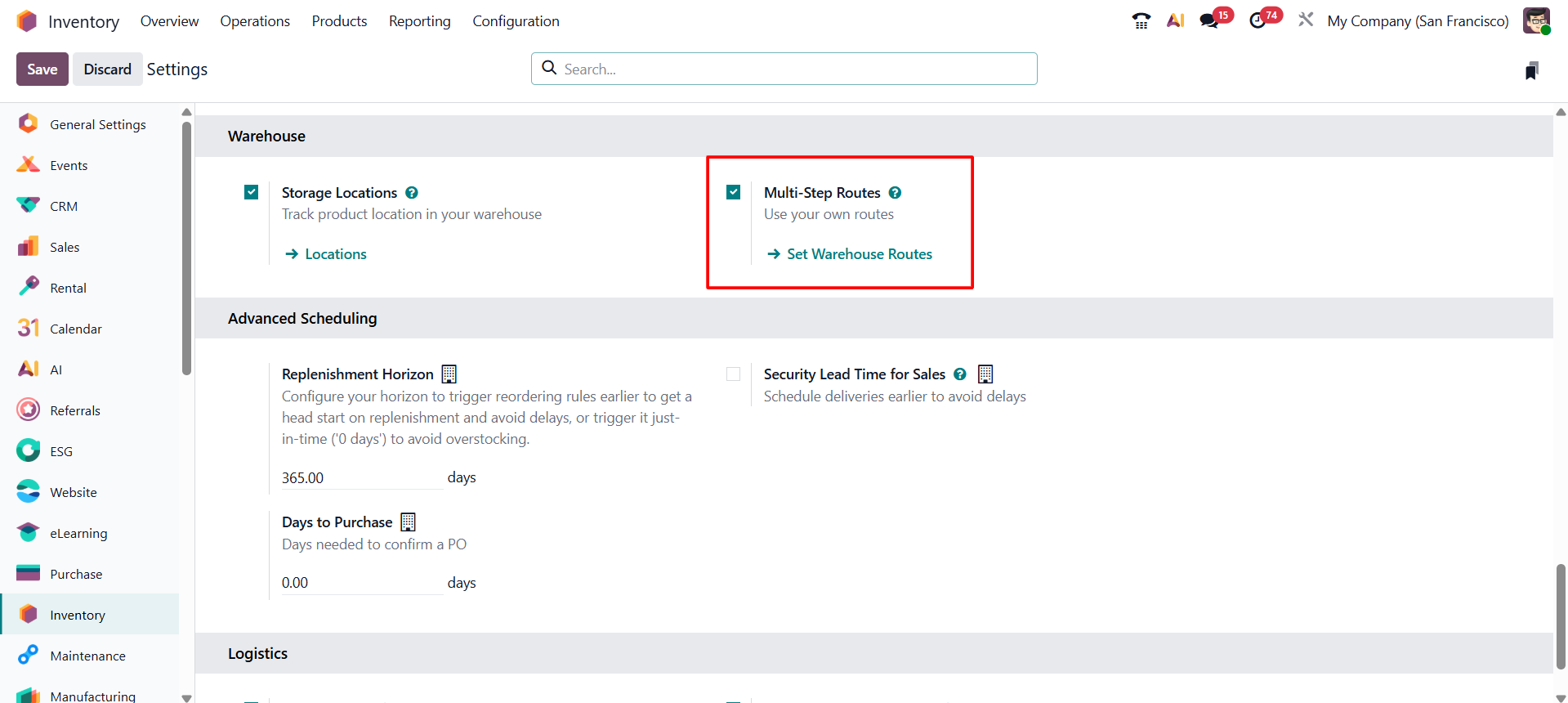
Step 1 — Enable Multi-Step Routes
Rules and routes only become fully configurable once Multi-Step Routes is switched on. Go to Inventory → Configuration → Settings, find the Warehouse section, and enable Multi-Step Routes. Odoo will automatically enable Storage Locations as well, since it's a prerequisite.
Step 2 — Create a Rule
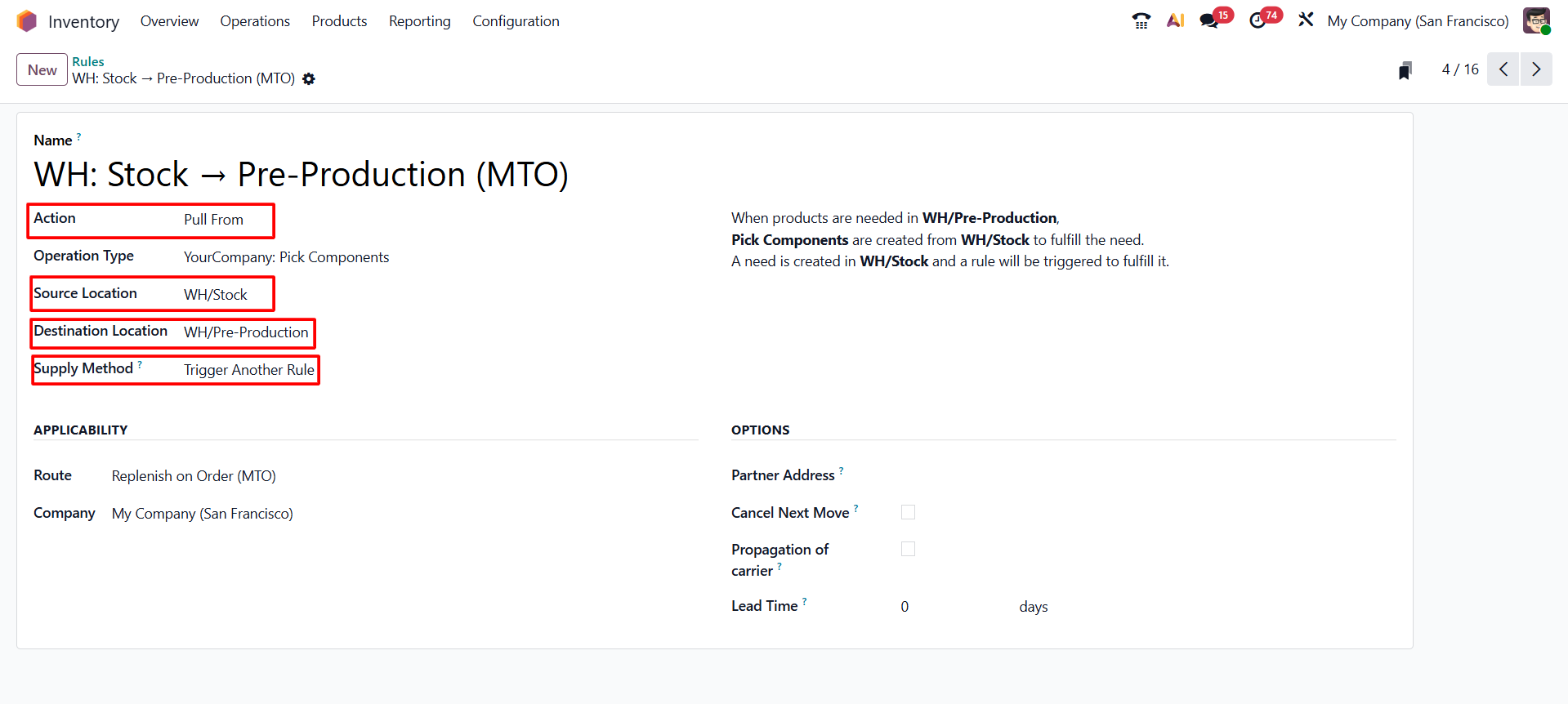
Navigate to Inventory → Configuration → Warehouse Management → Rules and click New. Give the rule a clear name, choose its Action (one of the five described earlier), select the Operation Type, and set the Source Location and Destination Location the rule should move stock between. If the action is Push To, also choose whether it runs manually or automatically. Then pick the Supply Method. Under the Applicability tab, select the company and the route this rule belongs to, and optionally configure a partner address, whether the next move should be cancelled, and any lead times.
Step 3 — Create a Route
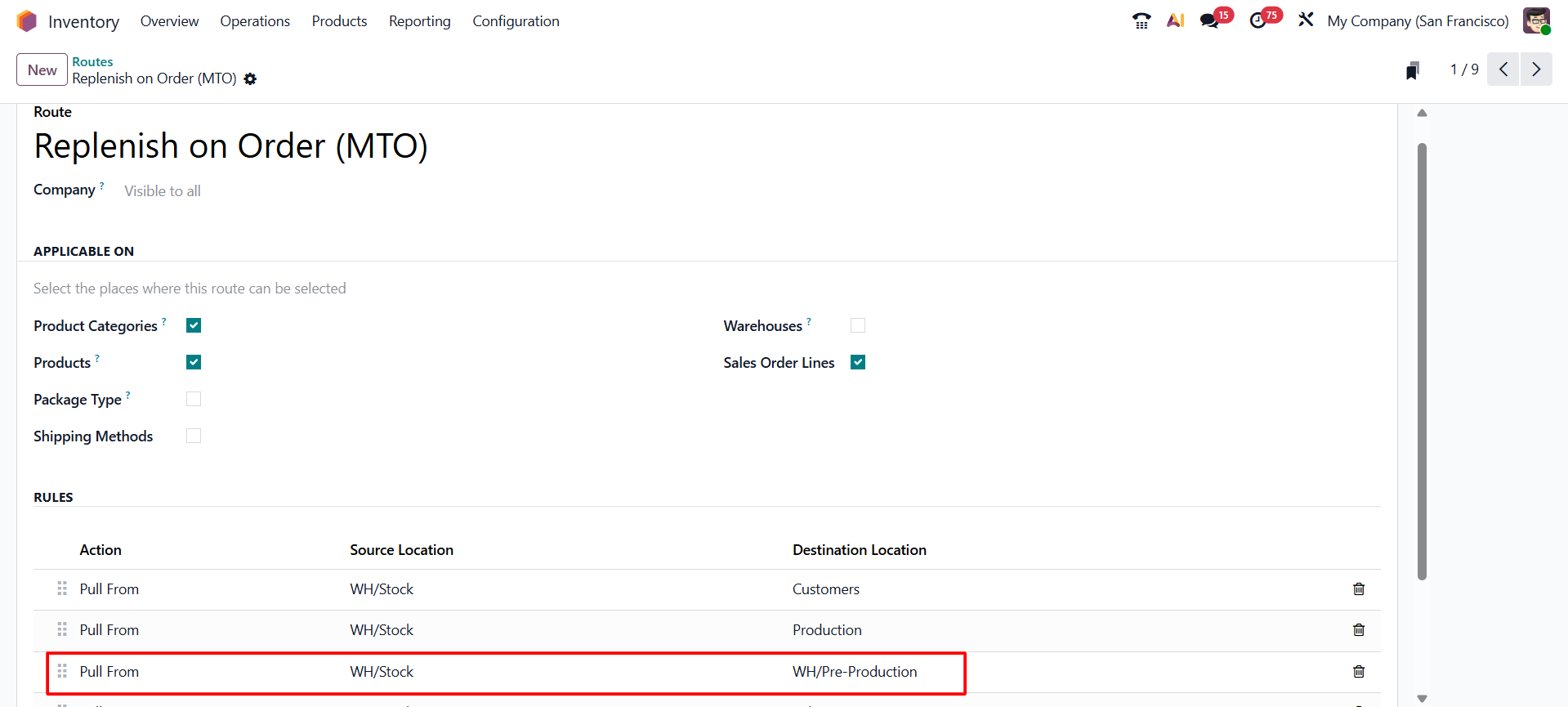
Go to Inventory → Configuration → Warehouse Management → Routes and click New. Enter a route name, and choose a Company (or leave it blank to apply the route across all companies). Under Applicable On, enable where this route can be used — products, product categories, and so on. Finally, click add a line to attach the rule (or rules) created in Step 2 to this route.
Step 4 — Apply the Route to a Product
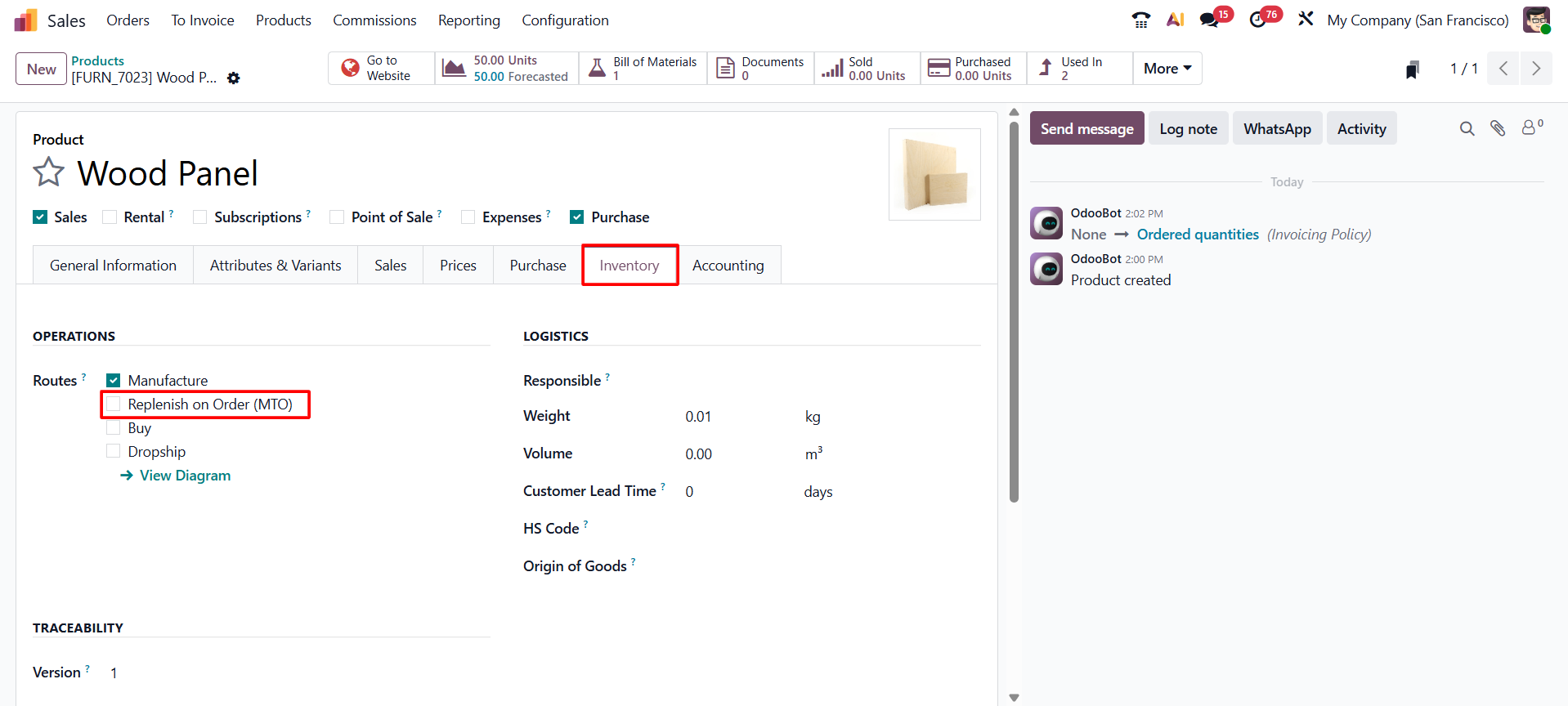
Open the product that should follow this route, go to its Inventory tab, and enable the new route from the list of available routes shown there. From this point on, Odoo will automatically apply the route's rules whenever this product needs to be replenished, stored, or moved.
Conclusion
Routes and rules are what let Odoo 19 Inventory run itself instead of requiring manual decisions for every stock movement. A route defines the path a product takes; the rules attached to it define the exact conditions and actions — pulling, pushing, manufacturing, or buying — that move stock along that path. Once Multi-Step Routes is enabled and a route with the right rules is applied to a product, replenishment, storage, and transfers happen automatically, freeing the warehouse team to focus on exceptions rather than routine movements.